

Solar Contractor Software
Werx is the office software for solar contractors who want to bill faster and protect margins. Run estimates, progress and AIA-style billing, job costing, and field time. Then sync it all to QuickBooks.
- Estimates and progress billing
- Job costing by cost code
- Two-way QuickBooks Online sync
Stop the busywork
Run your solar business without the spreadsheets
Solar installs are big jobs that bill in phases, with real labor and equipment costs. When estimates and job costs live in spreadsheets, margin leaks and cash comes in slow.
- Estimate in Excel
- Bill installs by hand
- Change orders unbilled
- Job costs after the fact
- Estimate fast in Werx
- Bill by progress or milestone
- Change orders billed
- Job costs in real time
Werx gets solar contractors out of spreadsheets. Estimate, bill by progress, track job costs, and get paid in one app.
The money side of a solar business for $49 a month
Construction billing and job costing platforms publish entry prices from $149 to $599 a month, with per-user fees up to $20 and features like job costing often gated to higher tiers (as of July 2026). Werx takes the opposite approach: flat plans from $49 a month, every feature on every plan, and users are $6.
For a solar installer, that is less than one service truck roll a month to run the entire office side. See pricing for the full breakdown, or compare Werx to the platforms you are looking at.
- Every feature on every plan, from day one
- Progress and AIA-style billing, estimates, and job costing included
- Users are $6 a month, time-only users $4, no caps
- No contracts, 14-day free trial, no credit card
Where solar contractors lose money
Most lost margin hides in billing and job costs. Here is where it slips, and how Werx catches it.
Slow estimates lose deals
A late quote loses the install. Build clean estimates fast and send them for online approval.
EstimatesInstalls billed late
Big installs need phased billing. Bill by progress or milestone instead of one lump invoice.
Progress billingCommercial pay apps in Excel
Commercial solar wants G702 and G703 style pay apps. Werx builds them from your schedule of values.
AIA billingUnbilled change orders
Extra work in the field often never gets billed. Werx turns field tickets into billable change orders.
Change ordersNo live job costs
Without real-time costs, panel and labor overruns hit late. Werx shows budget versus actual by cost code.
Job costingFeatures that move your solar business forward
Werx gives solar contractors the office tools to bid, bill, and get paid. Each one is built for install work, not borrowed from a generic app.
- Itemized and proposal estimates
- Progress billing
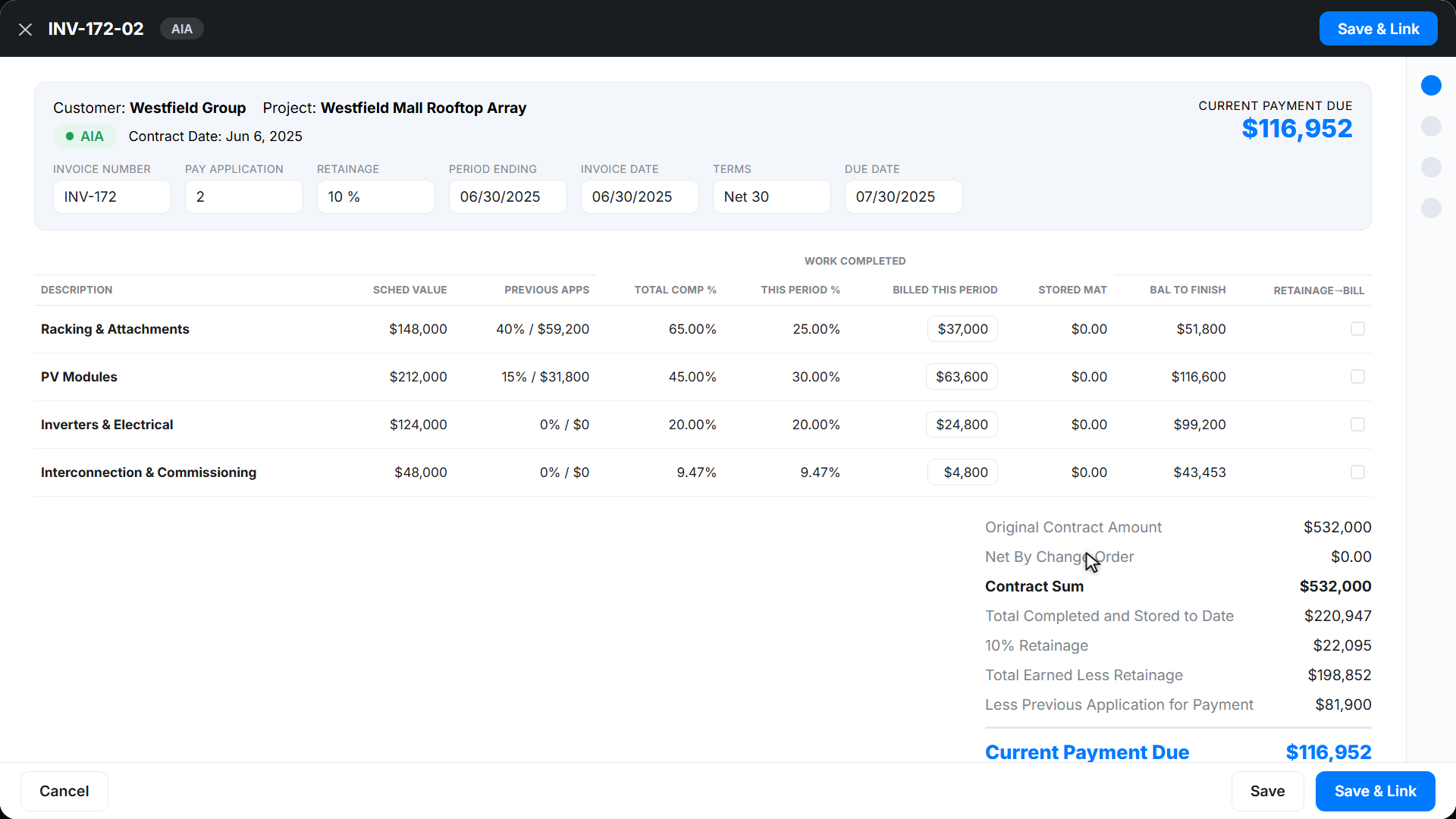
- AIA-style billing
- Time and material invoicing
- Change order tracking
- Field time tracking
- Job costing
- Job profitability
- Purchase orders
- RFIs and submittals
- QuickBooks integration
- Online payments
Bill an install by progress and get paid
Solar installs bill in phases, not one lump invoice. Werx bills by percent complete or milestone, and builds G702 and G703 style pay apps for commercial jobs.
Werx calculates the current amount due and folds in approved change orders. No spreadsheet, no math errors.
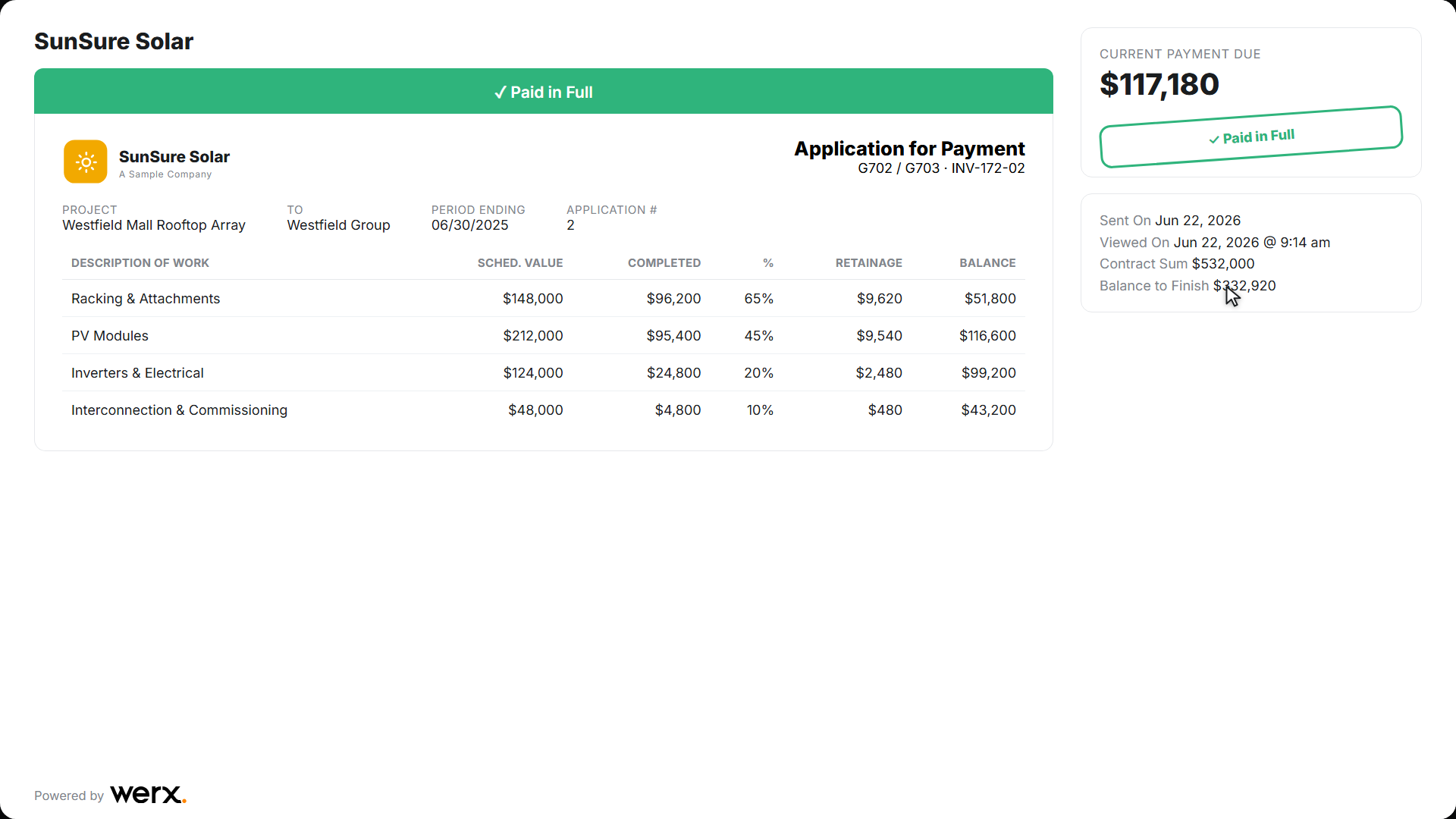
Send the bill through a branded portal. Customers review and pay online. Learn more about progress billing and AIA billing.
How a solar install bills in draws
A solar job should never be one invoice at the end. Panels and inverters get paid for months before permission to operate, so the billing has to follow the work. Here is how a $38,500 residential install might break into draws:
| Milestone | % of contract | Draw amount | Billed to date |
|---|---|---|---|
| Deposit at contract signing | 10% | $3,850 | $3,850 |
| Equipment delivered | 40% | $15,400 | $19,250 |
| Installation complete | 35% | $13,475 | $32,725 |
| Inspection passed | 10% | $3,850 | $36,575 |
| Permission to operate | 5% | $1,925 | $38,500 |
In Werx, each milestone becomes a progress bill the day you hit it, so the equipment draw goes out when the pallets arrive, not 60 days later. Commercial projects run the same idea on a schedule of values, billed as G702 and G703 style pay apps with retainage tracked. And because job costs post as the work happens, you can tell whether the install phase held its margin before you price the next system. See how progress billing works in Werx.
Send a bill your customer can pay online
Your customer opens a clean, branded estimate or progress bill. They approve or pay in a couple of taps. You see when they open it, so nothing stalls.
Software that runs the money side of your solar business
From the first estimate to the final payment, Werx keeps your billing, costs, and cash in one place.
Estimates and proposals
Build itemized estimates or proposals with markup and tax. Send for online approval, then turn the won deal into a project.
Progress and AIA-style billing
Bill installs by percent complete or milestone, and build G702 and G703 style pay apps for commercial jobs.
Time and material invoicing
Bill service and small jobs as T&M. Add labor and materials as the work happens.
Job costing and profit
Track budget versus actual by cost code, including panels and labor. See margin on every install.
Change orders
Capture extra work in the field, get it approved, and roll it into your next bill.
Field time tracking
Crews log time by job and cost code from the Werx Field App. Labor cost updates in real time.
Free tools for pricing and billing solar work
No signup, no catch. Use them on your next install, and keep the results.
Draw schedule calculator
Map your draws against costs and spot the cash gaps before they happen.
Build a draw scheduleConstruction bid calculator
Price a job from cost, overhead, and profit so the bid covers all three.
Price a bidMarkup vs margin calculator
See what your pricing actually earns after costs. Most owners are surprised.
Check your marginLabor burden calculator
What an installer really costs per hour with taxes, insurance, and benefits included.
Run the numbersROI calculator
What moving off spreadsheets is worth in hours and dollars for a crew your size.
See your ROI


Trusted by Contractors Like You

“It feels like the platform was built with real contractors in mind, not just software developers guessing what is needed.”

“It's a reliable tool that has helped me stay organized, manage tasks more efficiently, and keep projects on track.”
“Great program, user friendly and allows Project Managers easy access to monitor their project's budgets.”
Why solar contractors choose Werx
Most field apps skip the hard part: real billing and job costing. Werx is built for it.
Built for installs
Made for contractors who bill big phased jobs, not a plain invoice tool.
Phased and AIA-style billing
Bill by progress or milestone, and build G702 and G703 style pay apps for commercial work.
Know your margin
Live job costs and profit on every install, so you catch losses while you can still fix them.
Works with QuickBooks
Two-way sync with QuickBooks Online on every plan, at no extra cost.
One office system
Estimates, billing, costs, time, and payments in one place. No juggling apps.
Every draw lands in your books, automatically
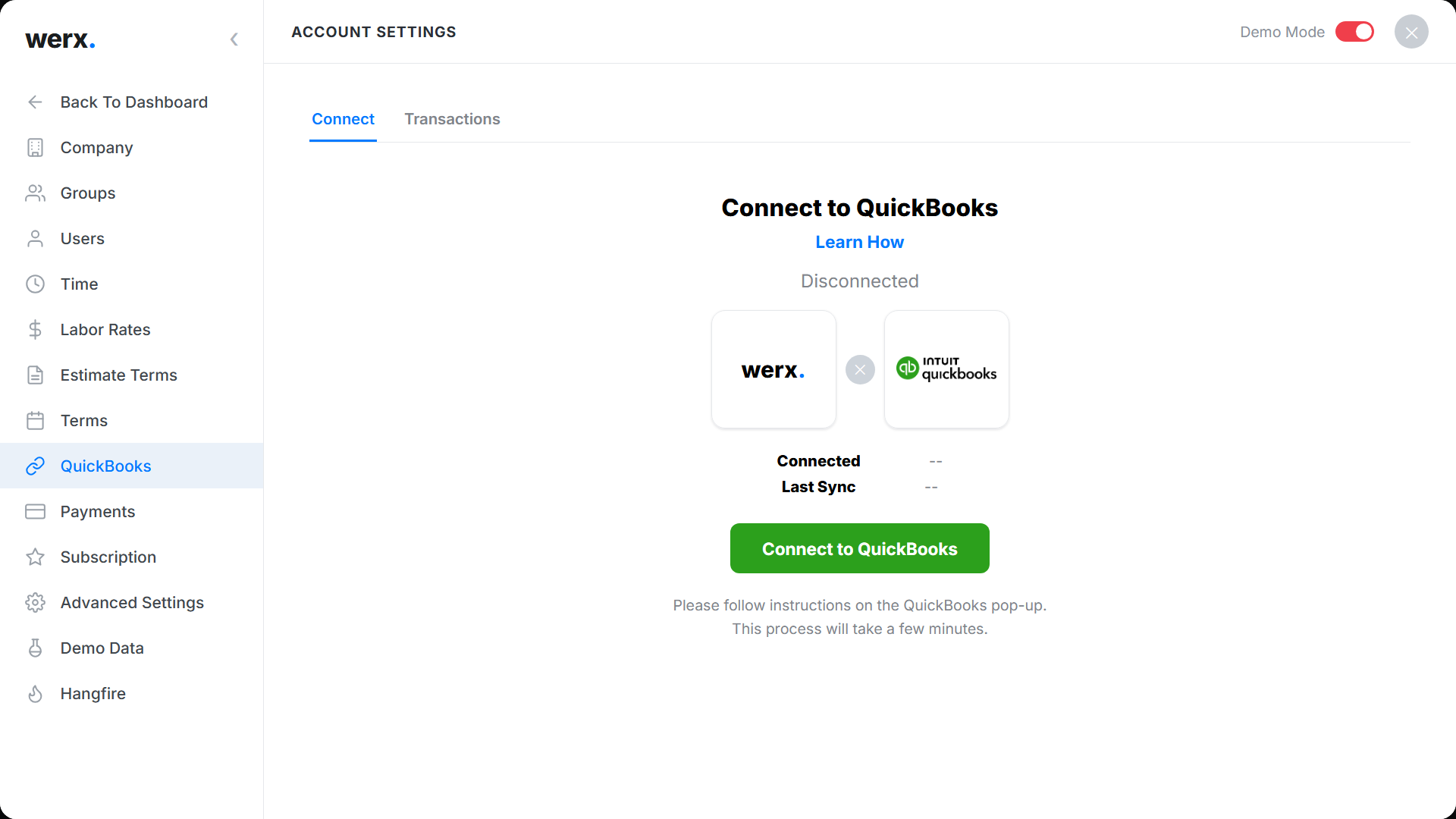
Solar jobs move real money: deposits, equipment draws, final payments, and a stack of supplier bills behind them. Werx keeps QuickBooks Online current while it happens. Draw invoices, customer payments, and job expenses sync in both directions, so the project side and the accounting side never drift apart, and nobody spends a Friday re-typing a month of invoices.
Guides for the business side of solar
Practical reads for the office side of a solar company.
Solar contractor billing and invoicing
A practical guide to billing solar work, from deposit to PTO.
Read the guideWhat is AIA billing?
G702 and G703 pay applications explained, for commercial solar projects.
Read the guideWIP reports and percentage of completion
How to see where every open project stands, in dollars.
Read the guideRetainage in construction billing
The held-back percent on commercial work, and how to collect all of it.
Read the guideMarkup vs margin: price for profit
Two numbers that get confused, and the profit that disappears when they do.
Read the guideWhat is solar contractor software?
Solar contractor software is an office tool that handles estimates, billing, job costs, and payments for solar installation companies. It replaces spreadsheets and paper for the money side of the business.
Solar is also growing faster than almost any trade in the country. The Bureau of Labor Statistics counted 28,600 solar photovoltaic installers working in 2024 and projects employment to grow 42 percent by 2034, one of the fastest rates of any occupation it tracks. Growth like that rewards the installers whose billing keeps pace with their crews.
Werx is built for install work. Estimate a system, turn the deal into a project, and bill by progress or milestone. Commercial jobs bill with AIA-style and progress billing on a schedule of values.
See job costs in real time, track labor from the field, and sync to QuickBooks. You bid, bill, and get paid from one place.
FAQ - Solar Contractor Software
Is Werx solar billing software?
Yes. Werx bills installs by progress or milestone, and builds G702 and G703 style pay apps for commercial jobs.
Can I create solar estimates and proposals?
Yes. Build itemized estimates or proposals with markup and tax, then send them for online approval.
Can Werx do job costing for solar installs?
Yes. Werx tracks budget versus actual by cost code, including panels and labor, with projected and to-date profit.
Does Werx work for residential and commercial solar?
Yes. Bill residential installs by progress or milestone, and commercial jobs with AIA-style and progress billing.
Can my customers pay online?
Yes. Werx connects to Stripe, so customers pay by credit card or ACH from the portal.
Does Werx sync with QuickBooks?
Yes. Werx syncs two ways with QuickBooks Online. Invoices, payments, and expenses flow into your books, included on every plan.
Is Werx solar business management software?
For the money side of the business, yes. Werx manages estimates, draw and progress billing, job costing, payments, and QuickBooks sync. It does not do system design, shading analysis, or crew scheduling. It makes sure the system you designed gets billed on time and stays profitable.
Can Werx bill a solar job in milestones or draws?
Yes. Set up draws like deposit, equipment delivery, installation, inspection, and PTO, then bill each one as you hit it. Commercial projects can bill on a schedule of values with AIA-style pay apps instead.
Does Werx replace my accounting software?
No, and it does not try to. Werx works alongside QuickBooks Online and syncs invoices, payments, and expenses both ways. Your accountant keeps the books they know, and the job data arrives clean.
What is solar contractor software?
Solar contractor software is the office tool that handles estimates, billing, job costs, and payments for a solar installation company. Some platforms handle system design or crew scheduling; Werx runs the money side, billing installs by progress or milestone and commercial projects with AIA-style pay applications.
How much does Werx cost for a solar business?
Plans start at $49 a month with every feature included, and extra users are $6 a month. There is no contract and no feature gating. Start with a 14-day free trial, no credit card required.
Simple to use. Free to try.
No credit card required · Free migration assistance · Cancel anytime