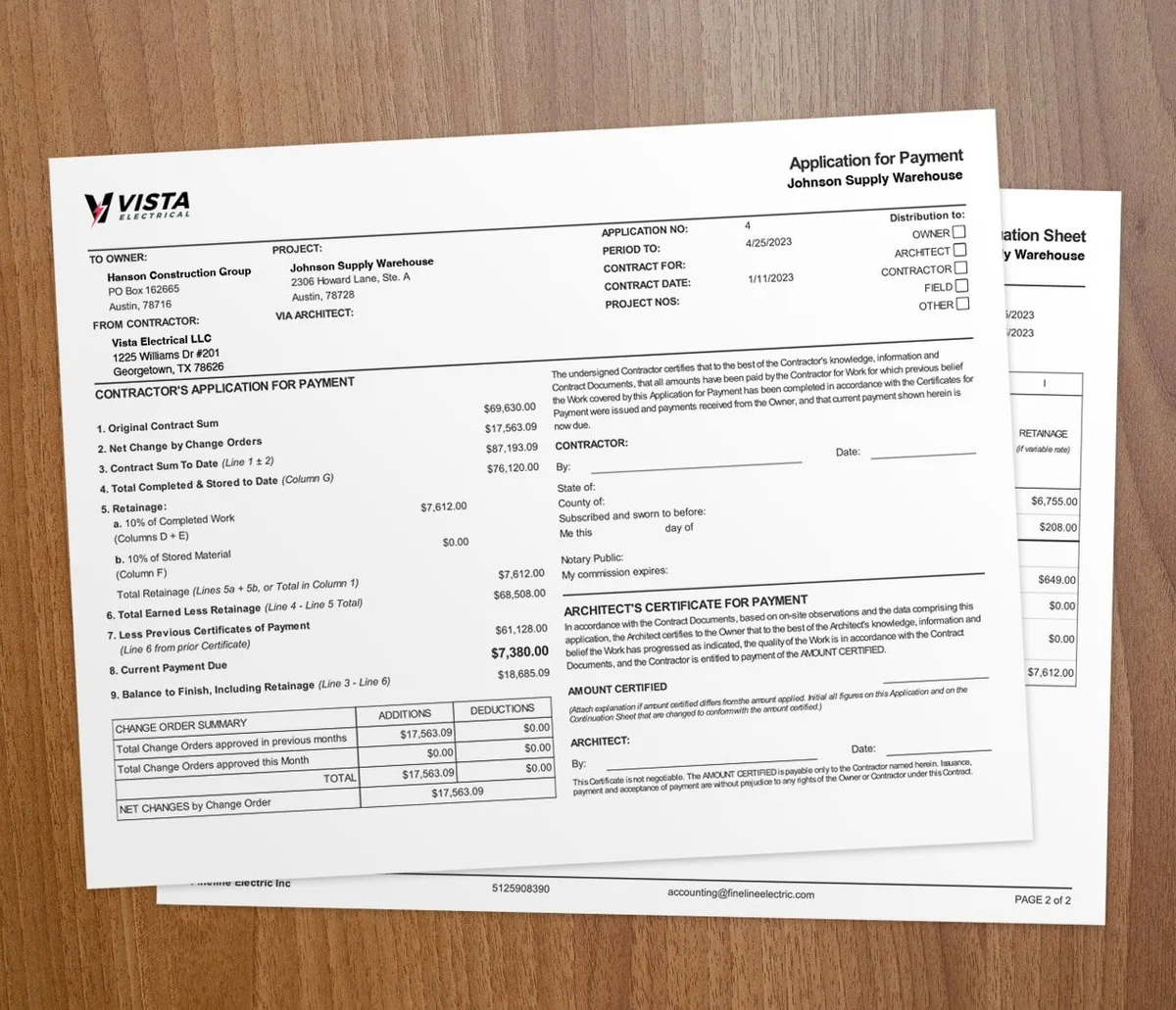
QuickBooks Online does not create AIA pay applications on most plans. There are no built-in G702 or G703 forms. Advanced added AIA-style invoicing in August 2026, but that plan runs $340 a month. On Simple Start, Essentials, or Plus, you build the schedule of values by hand and track retainage in a spreadsheet, or use AIA billing software that does the math and syncs to QuickBooks.
Why doesn't QuickBooks Online handle AIA billing?
QuickBooks Online tracks income and expenses well. On the plans most contractors buy, it does not produce AIA pay apps, the schedule of values, or retainage the way owners expect.
So contractors build workarounds. They piece together spreadsheets to manage pay apps, retainage, and change orders. Manual methods lead to math errors, missed payments, and confusion between parties.
That is why dedicated progress billing software and a tool that builds AIA G702 and G703 forms help so much.
Key parts: schedule of values, retainage, and change orders
| Line item | Scheduled value | % complete | Completed to date | |
|---|---|---|---|---|
| 1 | Mobilization & permits | $10,000 | 100% | $10,000 |
| 2 | Rough-in | $70,000 | 80% | $56,000 |
| 3 | Panels & gear | $50,000 | 45% | $22,500 |
| 4 | Fixtures | $45,000 | 20% | $9,000 |
| 5 | Trim & final | $25,000 | 0% | $0 |
What is a schedule of values?
The schedule of values breaks your full contract amount into line items. Each line is a phase or part of the job.
HVAC contractors might split ductwork, system install, and controls. Plumbers might split rough-in, fixtures, and final testing. For more, see how to build a schedule of values.
How does retainage work?
Retainage is a slice of each payment the client holds back until milestones or the whole job is done. It usually runs 5% to 10% of each pay app. Tracking it by hand in QuickBooks is tricky.
With retainage tracking in dedicated software, you always know the amount withheld and when to bill for the retainage release.
What about change orders?
No job goes exactly to plan. Change orders cover extra work or changes during the build. Tracking them, updating your SOV, and billing right in QuickBooks Online gets messy fast.
How to do AIA billing in QuickBooks Online, step by step
1. Set up the project and contract
Enter the project as a customer or sub-customer in QuickBooks Online. Add the total contract value, project address, and client details.
2. Build your schedule of values
Break the contract into line items for each phase or part of the work. Use a spreadsheet or AIA billing software to build the SOV, since QuickBooks has no native structure for it. Our free schedule of values builder does the line math online and exports to Excel.
3. Calculate and track retainage
Apply your contract retainage percent to each line or the full invoice. Most contracts call for 5% or 10%. Software makes this faster and more accurate than a spreadsheet.
4. Generate AIA-style progress invoices
Each billing period, figure the percent complete for every SOV line. Build a progress invoice that shows current billing, prior billing, and retainage held. For the full process on the forms, see our AIA retainage billing guide for G702 and G703.
5. Manage and bill change orders
Record change orders as new line items or SOV adjustments. Update your invoice and project totals to match.
How does Werx make AIA-style billing easy?
Simple schedule of values and progress billing
Build your schedule of values straight from your estimate, so every cost item lands in the right place. Generating AIA-style progress invoices takes a few clicks, with the fields filled in for you.
Automatic retainage and change orders
Werx withholds the right retainage percent and flags it for release at the right time. Change orders drop into your pay app and update your SOV and invoice totals on their own.
QuickBooks integration that keeps books accurate
All your projects, invoices, and payments sync with QuickBooks. That ends double entry and keeps your financial records correct.
What about QuickBooks Online Advanced?
In August 2026 Intuit added construction tools to Advanced at no extra cost. That includes job costing, budget versus actuals, change order management, WIP reporting, and what Intuit calls AIA-style invoicing tied to project phases and milestones.
That is a real answer, with two catches.
It is Advanced only, at $340 a month. Plus is $140, and Plus is the cheapest tier with any job costing.
And Intuit's wording stops at AIA-style invoicing by phase. It does not mention G702, G703, the schedule of values, retainage, or stored materials. Those are the fields a reviewer checks before releasing money.
If you are landing in QuickBooks Online after leaving Desktop, see what contractors lose moving to QuickBooks Online.
When should you move past QuickBooks workarounds?
Stick with QuickBooks alone if you rarely send AIA pay apps and a spreadsheet covers it. For a one-off small job, the workaround may be fine.
Move to AIA billing software once you run regular commercial jobs with retainage and change orders. The time you save on each pay app, plus fewer rejections, pays for the tool.
Key takeaways
- QuickBooks Online has no G702 or G703 forms. Advanced added AIA-style invoicing in 2026 at $340 a month.
- A precise schedule of values is the base of accurate progress billing.
- Retainage runs 5% to 10% per pay app, and software prevents missed withholdings.
- Change orders must flow into your SOV and billing each cycle.
- Werx syncs with QuickBooks so you skip double entry.